
Keep Experimentation Programs Organized Automatically
As experimentation programs grow, historical session recordings, heatmaps, and completed tests naturally accumulate over time.
Bluvia A/B Testing includes Cleanup Automation to help teams automatically archive older session recordings, heatmaps, and completed tests on a recurring monthly schedule while allowing teams to configure how long archived information is retained.
Optimization Programs Create More Maintenance Than Most Teams Expect
Running experiments is only part of maintaining a successful optimization program.
Over time, experimentation environments accumulate historical session recordings, heatmaps, completed tests, and other optimization data that requires ongoing management. While each item may seem small on its own, the combined volume can create unnecessary operational overhead and make experimentation environments more difficult to maintain.
For growing teams, maintaining a clean experimentation environment becomes increasingly important because disorganized data and manual upkeep can slow future optimization efforts.
Cleanup Automation helps reduce that burden by automating routine maintenance tasks, supporting testing program maintenance, and enabling more efficient WordPress optimization workflows.

Less Manual Maintenance = More Time for Optimization
Instead of spending time archiving older session recordings, heatmaps, and historical tests manually, teams can focus more attention on identifying opportunities, launching experiments, and improving website performance.
How do I automate routine maintenance tasks?
Routine maintenance tasks can often be automated by creating workflows that manage older data without requiring ongoing manual attention. Bluvia A/B Testing Cleanup Automation automatically archives older session recordings, heatmaps, and completed tests on a monthly schedule, helping teams maintain a cleaner experimentation environment while reducing routine upkeep. Teams can also configure retention settings to control how long archived data remains available.
Automated Archiving for WordPress Optimization Data
As optimization programs mature, historical data naturally grows alongside them.
Session recordings, heatmaps, and completed tests provide valuable context, but they can also create unnecessary clutter when older information remains mixed with current optimization activity.
Bluvia A/B Testing Cleanup Automation helps teams maintain a cleaner experimentation environment by separating active optimization work from historical information. This reduces manual upkeep, supports ongoing experimentation maintenance, and helps teams stay focused on current opportunities rather than administrative tasks.
Automated Monthly Archiving
Older session recordings, heatmaps, and completed tests are archived automatically on a recurring monthly schedule, helping keep active experimentation environments focused on current optimization activity.
Configurable Retention Settings
Control how long archived information remains available. Bluvia A/B Testing retains archived data for 12 months by default while allowing teams to configure retention settings based on their needs.
Long-Term Business Value
Keep active optimization work separate from historical data without losing valuable insights. Automated archiving reduces clutter, simplifies ongoing experimentation, and keeps your workspace organized as your optimization program grows.
What is cleanup automation?
Cleanup automation refers to automated maintenance workflows that help keep optimization environments organized over time.
Bluvia A/B Testing Cleanup Automation provides automated data cleanup by automatically archiving older session recordings, heatmaps, and completed tests on a recurring monthly schedule while allowing teams to configure how long archived information is retained.
How Cleanup Automation Works
Cleanup Automation follows a structured process designed to help teams maintain organized experimentation environments without ongoing manual effort.
On a recurring monthly schedule, Bluvia A/B Testing evaluates historical optimization data based on configured retention settings. Information that meets the archiving criteria is automatically moved out of active experimentation views and organized separately for future reference.
By combining automated archiving with configurable retention controls, Cleanup Automation helps preserve historical optimization data while keeping active environments focused on current optimization activity.
1
Optimization Data Accumulates
2
Monthly Cleanup Runs
3
Retention Rules Evaluated
4
Eligible Data Archived
5
Historical Data Organized
Bluvia A/B Testing Cleanup Automation automatically archives older session recordings, heatmaps, and completed tests on a recurring monthly schedule.
Archived information is retained for 12 months by default, and teams can configure retention settings based on their needs. This helps preserve historical optimization data while reducing the manual effort required to keep experimentation environments organized over time.
Cleanup Automation at Work
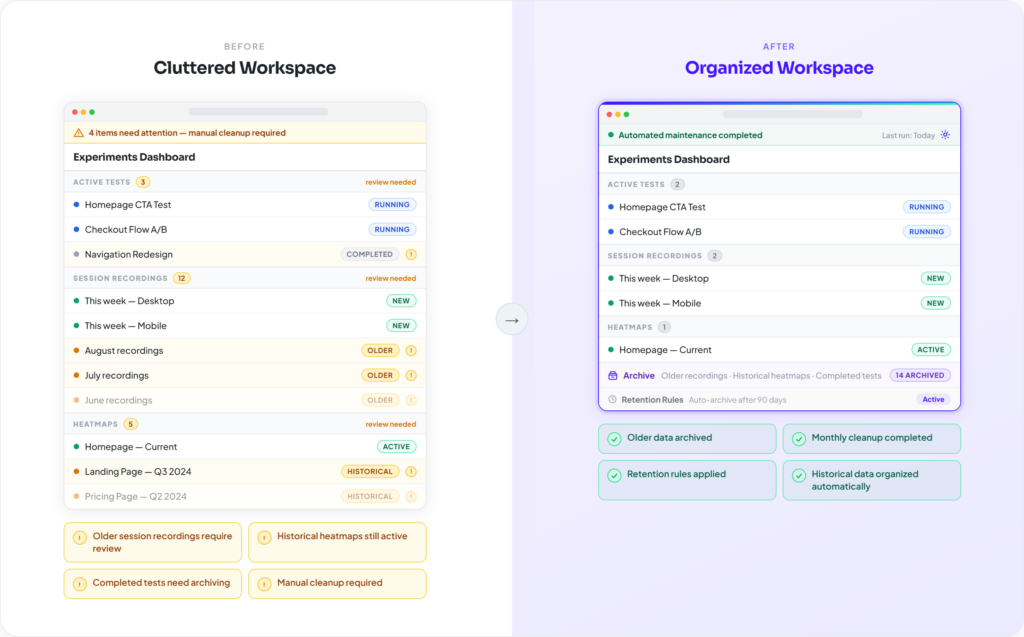
Less Manual Maintenance → More Time for Optimization
Instead of spending time reviewing older session recordings, organizing historical heatmaps, and manually archiving completed tests, teams can focus more attention on identifying opportunities, launching experiments, and improving website performance.
How do I automate routine maintenance tasks?
Bluvia A/B Testing Cleanup Automation helps automate routine housekeeping activities such as archiving older session recordings, heatmaps, completed tests, and other historical optimization data. By reducing repetitive upkeep, teams can maintain cleaner optimization environments with less manual effort.
Related Optimization Features
Explore more ways Bluvia A/B Testing helps teams analyze visitor behavior, improve conversion performance, and build smarter optimization systems without leaving WordPress.
Test Scheduling
Automate experiment launch timing and maintain optimization consistency.
Explore More
Test History
Preserve experiment learnings and maintain visibility into historical optimization efforts. Explore More
WordPress A/B Testing
Launch unlimited experiments directly inside WordPress.
Explore More
Frequently Asked Questions About Cleanup Automation
How do I reduce manual work in A/B testing?
Reducing manual work often starts with automating routine maintenance activities that accumulate as experimentation programs grow.
Bluvia A/B Testing Cleanup Automation helps WordPress teams reduce upkeep by automatically archiving older session recordings, heatmaps, and completed tests on a recurring monthly schedule. Teams can also configure retention settings to control how long archived information remains available.
By reducing the effort required to organize and maintain historical optimization data, teams can spend more time improving website performance and less time managing experimentation environments.
How do I keep experimentation data organized?
Maintaining organized experimentation data requires consistent maintenance processes. Bluvia A/B Testing Cleanup Automation helps support WordPress experimentation management by automating housekeeping tasks that keep environments cleaner and easier to manage.
How do I archive old optimization data automatically?
Bluvia A/B Testing Cleanup Automation automatically archives older session recordings, heatmaps, and tests on a recurring monthly schedule. Teams can also configure retention settings to determine how long archived information remains available.
Cleanup Automation helps teams archive old data automatically while maintaining access to historical optimization information.
Can I control how long archived data is retained?
Yes. Bluvia A/B Testing Cleanup Automation allows teams to configure retention settings for archived data based on their needs.
Older session recordings, heatmaps, and completed tests are archived automatically on a recurring monthly schedule. Archived information is retained for 12 months by default, but teams can adjust retention settings to better align with their optimization workflows and data management requirements.
Archived data is not automatically deleted when a retention period ends. Historical information remains stored and accessible unless it is manually removed by the user.
This helps maintain a cleaner experimentation environment while preserving access to historical optimization data when needed.
What happens to archived data after the retention period ends?
Archived data is not automatically deleted when a retention period ends.
Bluvia A/B Testing Cleanup Automation organizes and archives historical session recordings, heatmaps, and completed tests, but archived information remains stored and accessible unless it is manually removed by the user.
This allows teams to maintain cleaner experimentation environments while preserving access to historical optimization data for future reference.
Spend Less Time Maintaining. Spend More Time Optimizing.
Cleanup Automation helps WordPress teams automatically archive older session recordings, heatmaps, and completed tests while maintaining cleaner experimentation environments over time.
With Bluvia A/B Testing, teams can reduce manual upkeep, configure data retention settings, and stay focused on current optimization opportunities.
